
Trending

Disqus Shortname

sigma2

Home Top Ad

Responsive Ads Here

Post Top Ad

Responsive Ads Here

Archive

Post Bottom Ad

Responsive Ads Here

recent posts

latest tweets

Editors Picks

Follow us

random posts

recent posts

random posts

three columns

Fashion

News

Food

Sports

Food

Technology

Featured

Videos

Fixed Sidebar (true/false)

Formulir Kontak

Name

Email *

Message *

Fashion

Technology

Fashion

Technology

Fashion

Fashion

Label

Translate

grids

AD BANNER

cars

Pages

Comments

Ad

Label Icons CSS

a.Video:before {content:"\f144"} a.Car:before {content:"\f1b9"} a.Business:before {content:"\f0b1"} a.People:before {content:"\f183"} a.Nature:before {content:"\f06c"} a.Fashion:before {content:"\f0c4"} a.Gallery:before {content:"\f03e"} a.Technology:before {content:"\f1e6"} a.Learn:before, a.Culture:before {content:"\f02d"} a.Music:before {content:"\f001"} a.Sports:before {content:"\f091"} a.Children:before {content:"\f1ae"} a.Photography:before {content:"\f030"} a.Beauty:before {content:"\f004"} a.Food:before {content:"\f015"} a.News:before {content:"\f1ea"}

health

technology

Sunday, 3 September 2017

Must watch movies: September


After 2016, 2017 is set to be one of those years where you will have a lot to worry about saving your money for some extra-ordinary entertainment. Some of our favorite movies are set to make their mark taking their stories one step further. Every one out there is eagerly waiting and I am no different. Now that it's September, you've already had your journey started and sure it's been great.


So let's begin with the ones September has to offer to us:

8th September, 2017

It


Up for some creepy clown haunting? We've got you covered.
A group of bullied kids band together when a monster, taking the appearance of a clown, begins hunting children. The trailers alone, are spooky. If you haven't watched them yet, watch them below:


9/11


We're all aware of the tragedy of 9/11. We've seen videos of what it looked like from the outside. But what happens when a group of 5 people find themselves trapped inside an elevator when the sky fell on them? They didn't lose hope, in the very least. Watch the trailer below:


15th September, 2017

Mother!


See Jennifer Lawrence deal with her married life with husband Javier Bardem. Everything was fine until some uninvited guests enter their life. And the test began:


American Assassin


We guess Spider-man was just not enough for Michael Keaton as he's back already in this counter terrorism thriller. Watch the trailer below:


22th September, 2017

Kingsman: The Golden Circle


Guess who's back? Colin Firth and Taron Egerton, and they have company. Julianne Moore, Halle Berry, and Channing Tatum are set to rock the stage with them! Watch the trailer below:


The LEGO Ninjago Movie


You thought your wallet was spared already? Not just yet. LEGO brings you another one of it's action-packed movies. A ninja deals with the harsh fact that his dad is evil. Let's be there for him and help him fight evil:


With this, the month of September is covered. I hope you don't miss any of these. Stay tuned for more!

Wednesday, 23 August 2017

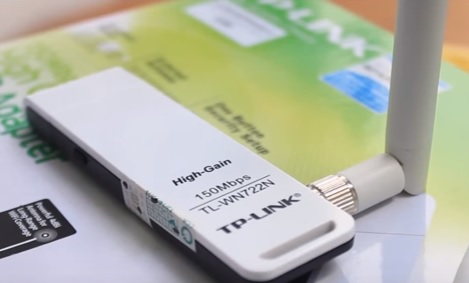
TP-LINK TL-WN722N does not support Kali Linux


Did you just started working on Kali Linux? Are you looking for some decent external Wifi adapters that support the monitor mode? Did you also stumble onto the TP-LINK Wifi adapter and you just bought it because some people claim that it works perfectly on Kali Linux? So you're one of those people who's rather disappointed because the TP-LINK TL-WN722N doesn't support Kali Linux anymore.

You and I are on the same boat on this one. Dealing with this sad reality, I decided to seek some official help and that's when I learned the harsh truth. TP-LINK TL_WN722N isn't supported on Kali Linux. Apparently, Kali Linux is based on the new Linux kernel which the WN722N V2 doesn't support. I contacted the official US website for help and all they offered was disappointment which can be seen in the image below:


So now we know for sure that the TP-LINK TL-WN722N does not support Kali Linux. So it's time we stop trying and start looking for other options.

Monday, 17 July 2017

Unlock Bootloader for Mi Devices


Image result for mi6


We're all familiar with the spectacular low-budget Xiaomi devices. And although the older ones come with unlocked bootloaders, Xiaomi recently decided to lock the bootloaders starting from devices like Mi5 and Redmi Note 3. And ever since, unlocking bootloaders for Mi devices has been quite a task if you're not fully aware of all the drivers and the method. But that's for later. The first step is to get your device approved for unlocking your bootloader. The approval process can be as quick as the 2nd day or as lengthy as the 15th day. So you will have to wait for about 2-15 days to get your device approved of which you will be notified via SMS. After you have received your confirmation, follow the guide below to unlock your device's bootloader.


What is bootloader?

Bootloader is a piece of code that runs before any operating system is running. Bootloader is used to boot other operating systems, usually each operating system has a set of bootloaders specific for it.

Why unlock bootloader?

1. Let's say you're using a Xiaomi device that is not from your region (Chinese) and you wanna change that. You want a device that you can fully understand and appreciate. So to do that, you'll have to flash a Global Rom to your device. But to flash a Global Rom, you'll need an unlocked bootloader.

2. If you're seeking root access, an unlocked bootloader is a necessity.

So there we have some major reasons to get your device unlocked now. Let's begin with the process of applying.

Warning: I'm not responsible for any kind of damage to your device. Do it at your own risk.

This can be done by following the steps below:

1. Go to the official Mi Unlock Request Page using this LINK.


2. Now click on the Unlock Now button and complete the sign up using your e-mail and mobile number.


3. When you're done signing up, you'll receive a confirmation message on your registered mobile number.

4. You're done for the first part. Now, all you need to do is wait for the approval. You'll receive a SMS stating 'You've been granted the permission to unlock your device (Mi Account) along with a link to downloading Mi Unlock Tool. Download the tool using that link.

5. Download and install the following drivers and tools: ADB Tool and Minimal ADB and Fastboot Drivers.


6. Now go to About of your phone. Now tap on MIUI Version 7 times and you'll see a pop-up that says you're now a developer. Go to Settings> Additional Settings> Developer Options and enable USB Debugging and OEM Unlock.

Image result for mi5 developer


7. After you've installed all the drivers from Step 5, open the Mi Unlock Tool and sign in to your exact account you used to get the unlock permission. 


8. After you sign in, put your device to bootloader mode. This can be done by switching your device off and then holding the Volume Down key and the Power Button simultaneously for a few seconds until you see the Mi logo followed by a Rabbit fixing an Android.


NOTE: Unlocking your device will erase all your data so make sure you backup your device before unlocking.

9. Now connect your device using a USB Cable to the PC in bootloader mode. In the Unlock tool, you will see that the phone is connected(if drivers are installed properly). Now click on Unlock button and wait for a while. After the process is complete, the phone will reboot. The first boot might take longer than usual, so be patient. 

10. That's it. Now you have an unlocked Xiaomi device which you can easily root or flash a new rom in.


Thursday, 29 June 2017

Must watch movies: July


After 2016, 2017 is set to be one of those years where you will have a lot to worry about saving your money for some extra-ordinary entertainment. Some of our favorite movies are set to make their mark taking their stories one step further. Every one out there is eagerly waiting and I am no different. Now that it's July, you've already had your journey started and sure it's been great. And I'm pretty sure you have had a major crush on Gal Gadot by now like every overwhelmed DC Comics fan.

So let's begin with the ones July has to offer to us:

7th July, 2017

Spider-Man: Homecoming


Well, guess who's back for another reboot? The first movie for the month of July itself is a treat even for every Non-Marvel fan because hey, let's face it, who can ever hate this decent photographer in the red suit? And with all the teenage drama, let's hope this turns out to be the best of it's predecessors. Let's not forget Iron man showing up every now and then. The trailers have made us all pretty excited. If you haven't watched them yet, watch them below:


14th July,2017

War for the Planet of the Apes


The third installment to the Apes series is almost upon us. Caesar is all ready to unleash his rage over the sufferings his kind had been through because of the humans. He's all ready to take down an entire species to protect his own. Horse-riding apes with guns? Hell yeah! Watch the trailer below:


21st July, 2017

Dunkirk


Here is another masterpiece (to-be) from the genius director Christopher Nolan. After everything he's presented us with so far, I am ready to bet on this one as well. A depiction of WWII from Nolan. Watch the trailer below and hold your horses for a little more while:


28th July, 2017

The Emoji Movie


This one is for the ones who love animated movies. The first question that comes to mind after seeing this poster: Did we really need a movie on Emojis? But then again, don't we love them anyway? Who refrains from using an emoji unless he's not a robot? A story about the journey of a multi-expression emoji towards becoming a normal one. Watch the trailer below:


With this, the month of July is covered. I hope you don't miss any of these. Stay tuned for more!

Wednesday, 21 June 2017

OnePlus 5: Focus on what matters [Updated]


So one day to go for the launch of OnePlus's latest flagship killer OnePlus 5 in India and here we present you with every confirmed fact straight and simple. Before we start, let's take a look at the predecessors of the newly unleashed(to be) beast. We're all aware of the huge success of it's previous flagship phones, the OnePlus 3 and OnePlus 3T which gave everything we seek in a premium smartphone. A Qualcomm SD 821 processing device powered by 6GB of RAM. Everything you'd want for your day to pass by smoothly. But hey, what if someone is providing you with even better specs for a little more money? Quite convinced now, aren't you? There's still more.


You may also be wondering what happened to the supposed OnePlus 4. Apparently, OnePlus is superstitious about numbers and what they stand for. So OnePlus refrained from using the number 4 because it is considered as a symbol of death in China. So they decided to skip it just to be on the safer side. Well, didn't see that one coming.


Let's talk about confirmed specs now. The phone was released officially yesterday in NYC and so we now have the confirmed specs. So let's take a look:


Dimensions: 154.2 x 74.1 x 7.25mm 
Weight: 153g 
Display: 5.5in Optic AMOLED capacitive touchscreen (73.0% screen-to-body ratio), 16M colors, 1080 x 1920 pixels (401ppi pixel density), Corning Gorilla Glass 5 
Software: Android 7.1.1 (Nougat) with Oxygen OS 
CPU: Qualcomm MSM8998 Snapdragon 835 Octa-core (4x2.45GHz Kryo & 4x1.9GHz Kryo) 
GPU: Adreno 540 Internal storage & RAM: 64GB with 6GB RAM OR 128GB with 8GB RAM Primary Camera: Dual-Sensor; 16MP with f/1.7 aperture, 1/2.8" sensor size and 1.12 µm pixel size, optical stabilization (OIS) + 20 MP with f/2.6 aperture and 1.0 µm pixel size, phase detection autofocus, 2x optical zoom, dual-LED flash, geo-tagging, touch focus, face detection, HDR, panorama 2160p video @30fps, 1080p video @30/60fps, 720p video @30/120fps 
Secondary Camera: 16MP with f/2.0 aperture and 1.0 µm pixel size, electronic stabilisation (gyro), 1080p video, Auto HDR 
Loudspeaker: Yes 
3.5mm jack: Yes
Connectivity: WLAN Wi-Fi 802.11 a/b/g/n/ac, Wi-Fi Direct, DLNA, Wi-Fi Hotspot, Bluetooth 5.0, NFC, USB Type-C 2.0 
GPS: Yes, with A-GPS, GLONASS, BDS 
Battery: Non-removable Li-Ion 3,300 mAh battery 
Colors: Midnight Black, Slate Gray 

So it's safe to say that this is gonna be the best smartphone in it's price range. But what is the expected price? We have it now. The 6GB+64GB variant is priced at Rs 32999/- and the 8GB+128GB variant costs Rs 37999/-

So are you already up for it?


Monday, 19 June 2017

Enable Google Assistant on any Android Device [No Root Method]


Google recently launched it's latest feat in the field of Smartphones. Google Pixel is a remarkable device with possibly the best smartphone camera along with other features. But what makes it stand tall is the introduction of the Siri alternative for android, the Google Assistant. While Google has promised us that it soon will release it for other devices as well, it still remains uncertain when. But the wait is over as you're in the right place. Below is a guide on enabling Google Assistant in your rooted Android Device.


So what's different this time is that now we can enable the Google Assistant without the root access as well. Follow the guide below.

Update: Tested and running smoothly in Samsung Galaxy S7 and S7 Edge, OnePlus 2, OnePlus 3, Xiaomi Mi5 and Yu Yureka Plus.

Step 1:

First of all, go to Settings>Google Settings


Step 2:

Click on the dotted menu on the top-right corner and then click on Help & feedback.


Step 3:

Then again click on the dotted menu and then click on View in Google Play Store.


Step 4: 

Now you'll see the Google Play Services app in the Playstore. Keep scrolling down until you find the Become a Beta Tester option and click on Yes, I'm in. It'll take about 5 mins to sign you up, so please be patient.


Step 5:

After the Google Play Services is completed signing up, repeat the process for the Google app as well.


Step 6:

After you've signed up for both, go to My apps and games. There, you'll find a new tab that goes by the name Beta. Click on it and update both the Google Play Services and Google Now app.


Step 7:

After you're done updating both the apps, close the Playstore. Now long-press the Home Button to enable the Google Assistant. When you do it for the first time, you'll need to configure it to your own preferences. Make sure you're using your native language in the Language and Input menu in Settings of your device.


Note: In case your Assistant does not show up on long-pressing the Home button, go to Settings>Buttons and set your home button for Google Assistant.

If you're having issues updating the Google Play Services and Google app beta versions, download the APK file from below and install manually:


Friday, 12 May 2017

Play Nintendo 3DS Games on PC using Citra Emulator


So you want to play all those addictive and entertaining 3DS games but don't wanna spend a handsome amount of money on it? You don't need to unless you have a potato PC, simply put. If your PC meets minimum requirements to run this emulator, you can play almost every 3DS game on your PC with your own preferred settings. 


It was rather disappointing at the very start when Pokémon Sun and Moon were about to hit the stores but were only accessible using a Nintendo 3DS Console. Citra, a 3DS Emulator, in its initial phase, experienced a lot of bugs and crashes when tested with Pokémon Sun and Moon ROMs. But fortunately, it was only a matter of time when everything was figured out by the developers and now we can play Pokémon Sun and Moon with quite decent FPS with almost no bugs. So all you need to make sure is that your PC meets the minimum specifications listed below:


A graphic chip that supports at least OpenGL 3.3
64-bit OS


In case you meet these minimum requirements and yet somehow experience a bit of lag, let me tell you, it's still in it's nightly phase. Give it time. But surely, it offers sufficient FPS to brand a game being played, playable. Another thing you'd wanna be sure about is that the ROM you're using, should be patched for Citra. So that's all there is to this. Download the emulator from the link given below and enjoy!

DOWNLOAD


How to Play:

Now after you've downloaded the emulator, extract it. Now you'll see an application named citra-qt. So all you need to do is, drag your downloaded ROM into that application and the game will start on it's own. Furthermore, you can change graphical settings and controls from the menu.

Comments System

blogger/disqus/facebook

Disqus Shortname

designcart